Article Highlights
- A cloud migration plan should begin with business outcomes, deadlines, success metrics, and non-negotiable constraints.
- Workload inventory must cover applications, data, infrastructure, integrations, operational ownership, and recovery requirements.
- Dependency mapping determines which workloads can move independently and which need a coordinated migration wave.
- Business value, technical condition, cloud suitability, risk, economics, and readiness provide a consistent assessment structure.
- Retire, retain, rehost, replatform, refactor, rearchitect, rebuild, and replace address different workload constraints.
- Total cost includes the current environment, target operations, transition work, and the financial effect of migration risk.
A cloud migration strategy should begin with the required business outcome, known constraints, and a separate decision for each workload. Selecting a provider or moving every system to the same target environment does not account for differences in value, risk, technical condition, and remaining lifespan.
In this context, a workload includes more than an application or virtual machine. It covers application services, databases, data flows, integrations, infrastructure, runtime components, security requirements, and operating processes. Availability targets, recovery time objective (RTO), recovery point objective (RPO), deployment procedures, support responsibilities, and technical ownership are also part of the workload.
A company can move an application’s infrastructure to the cloud while retaining expensive licenses, unresolved dependencies, technical debt, and manual operations. Technical compatibility alone does not prove that cloud migration will reduce cost, improve delivery, or lower operational risk.
Start with Business Drivers and Hard Constraints
A migration strategy should not start with a cloud service or provider. The first step is to define the reason for change and the measurable result the company expects.
The table below shows how common business drivers can influence workload decisions. These are planning directions rather than fixed rules, the final choice still depends on workload condition, dependencies, cost, and risk.
| Business driver | Possible success metric | Influence on strategy |
|---|---|---|
| Data-center exit | Workloads migrated before contract expiration | Rehost and replatform may receive priority |
| Infrastructure cost reduction | Three-year total cost of ownership, cost per transaction | Retire, rehost with rightsizing, or replatform |
| Faster product delivery | Deployment frequency, change lead time | Refactor or rearchitect high-change workloads |
| Better resilience | Availability, RTO, RPO, incident rate | Replatform or rearchitect critical workloads |
| International expansion | Regional availability, user latency | Rehost or replatform for regional deployment; rearchitect when latency or data-location requirements demand structural change |
| Security and compliance | Unsupported components, control coverage | Replatform, replace, or rebuild |
| Capacity constraints | Time to provision capacity, peak utilization | Rehost, replatform, or rearchitect |
After defining the business driver, document the constraints that can remove certain options from consideration. These commonly include data residency, latency, connectivity, licensing restrictions, specialized hardware, unsupported operating systems or databases, and the permitted downtime window.
The assessment should also cover contractual obligations, security requirements, recovery targets, available cloud skills, budget limits, and the workload’s remaining lifespan. A system scheduled for retirement in twelve months requires a different cloud migration decision from a core product expected to support the business for another decade.
Some constraints can exclude an approach before financial comparison begins. Strict latency requirements can prevent moving a dependent component away from an on-premises system. Licensing terms can make rehosting more expensive than replacement. Limited downtime can require phased migration, replication, or parallel operation.
Create a Migration Brief
This stage should produce a short migration brief that records the required business outcome, deadline, measurable success criteria, non-negotiable constraints, executive owner, available budget, accepted risk level, and the assumptions that still require validation.
The brief provides a shared basis for evaluating each workload and prevents the migration strategy from becoming a list of technical preferences without a defined business result.
Build a Workload Inventory and Dependency Map
A cloud migration plan needs a portfolio view before the team selects an approach for individual workloads. Without a complete inventory, the migration strategy can overlook shared systems, operational requirements, and dependencies that affect migration order, cost, and risk.
Document the Business Context
For each workload, record its business function, owner, users, affected departments, criticality, and revenue or operational impact. The inventory should also include the expected remaining lifespan and planned product changes.
This context helps distinguish a core product that requires long-term investment from a low-value system that could be retained temporarily, replaced, or retired. It also prevents technical complexity from becoming the only factor in the cloud migration decision.
Record the Technical Scope
Document the applications, databases, infrastructure, and environments included in each workload. Record technology versions, vendor support status, utilization, peak load, data volume, and expected growth.
The technical inventory should identify upstream and downstream dependencies, application programming interfaces (APIs), file transfers, scheduled jobs, authentication services, and identity dependencies. Availability targets, recovery requirements, and data-location restrictions should also be connected to the workload.
Capture Operational Requirements
Operational information should cover deployment frequency, incident history, support effort, maintenance windows, monitoring coverage, and backup and recovery procedures. Record the responsible team, available documentation, and manual steps required to release, operate, or restore the system.
These details influence the migration strategy because an application with undocumented recovery steps or limited monitoring requires additional preparation before migration.
Combine Automated Discovery with Team Validation
Discovery tools can identify infrastructure components, network traffic, and observed connections. They do not establish whether a dependency is business-critical, latency-sensitive, temporary, or safe to separate during migration.
Validate automated findings through architecture reviews, workload-owner interviews, documentation checks, and production traffic analysis. This process should confirm which connections are active, which systems depend on them, and which dependencies remain unknown.
Structure the Dependency Map
The dependency map should trace the workload from its users to the supporting operational services:
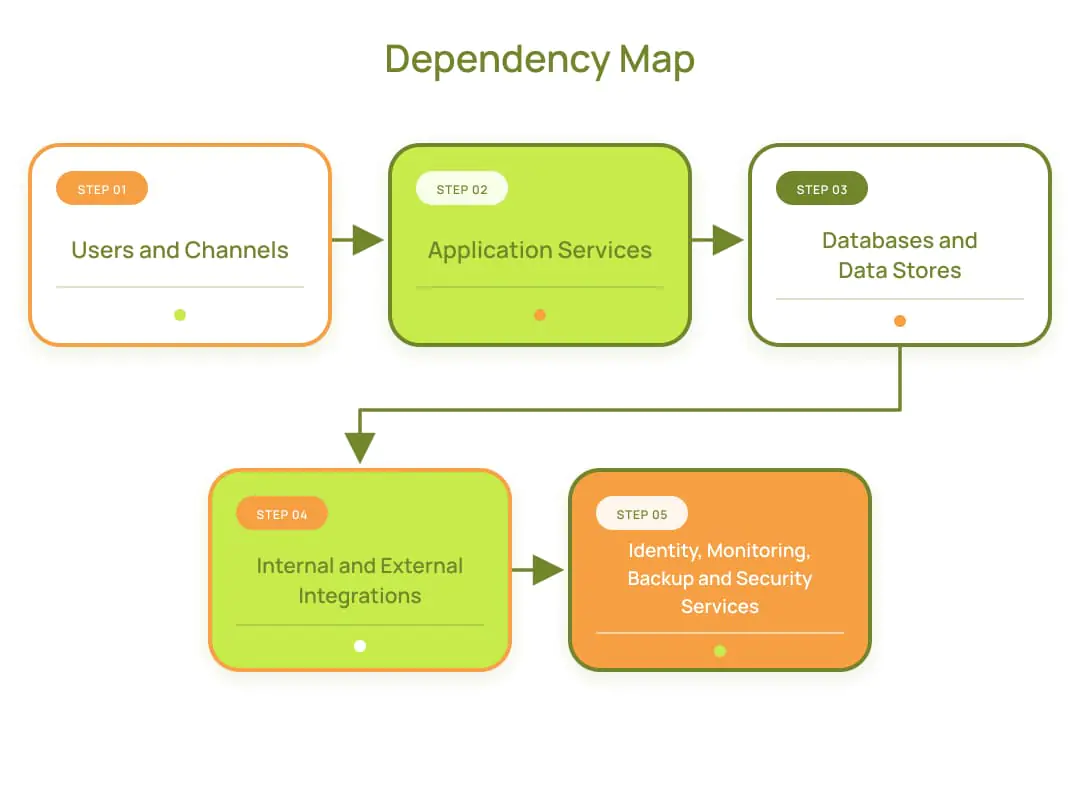
Pay particular attention to shared databases, undocumented batch jobs, direct database connections, hardcoded Internet Protocol (IP) addresses, and local file dependencies. Active Directory, third-party allowlists, reporting systems, and data residency boundaries can also prevent a workload from moving independently.
The map should identify the direction of each dependency, responsible owner, communication method, data exchanged, and operational consequence of failure. Unknown relationships should remain visible as migration risks instead of being treated as resolved.
Define Move Groups
Dependencies determine the correct migration unit. A workload that shares a database, identity service, or tightly connected batch process with another system can require coordinated migration.
Group related workloads when separating them would create excessive latency, extended downtime, duplicate data, or temporary integration work. The resulting move groups give the cloud migration strategy a practical basis for sequencing workloads and selecting the appropriate approach for each group.
Assess Each Workload Across Six Dimensions
A reliable cloud migration decision requires consistent evidence rather than a general assessment that a workload is “ready for the cloud.” Each workload should be evaluated across five dimensions before the team selects a migration strategy.
| Assessment dimension | Evidence to collect | Decision it informs |
|---|---|---|
| Business value | Criticality, users, revenue impact, future roadmap | Retire, replace, retain, or invest |
| Technical condition | Support status, architecture, technical debt, performance | Rehost, replatform, or modernize |
| Cloud suitability | Dependencies, latency, data volume, platform compatibility | Migration feasibility and target architecture |
| Risk | Compliance, security, downtime, recovery, blast radius | Controls, sequencing, and rollback |
| Economics | Current operating cost, target cost, transition cost, usage assumptions, and unit economics | Financial viability and total cost of ownership |
| Delivery readiness | Skills, ownership, platform foundations, tooling, migration capacity, and operational readiness | Timing, sourcing model, and migration wave readiness |
Apply the Assessment
Business value establishes how much investment the workload justifies. Record the function it supports, its users, revenue or operational impact, and the consequences of an hour or a day of downtime. Confirm its expected lifespan and check if another system already provides the same capability. A low-value or duplicated workload may be a retirement or replacement candidate rather than a cloud migration priority.
Technical condition shows which problems would remain after an infrastructure move. Review the support status of the operating system, database, runtime, and major dependencies. Examine performance limits, manual scaling, test coverage, release risk, and technical debt. Rehosting an application does not resolve constraints embedded in its code, architecture, or operating model.
Cloud suitability covers the practical conditions of running the workload in the target environment. Identify where its data resides, which dependencies must remain connected, and how latency or network traffic could affect critical transactions. Confirm platform compatibility, vendor restrictions, data-transfer volumes, and the effect of splitting connected systems between cloud and current environments. This part of the cloud migration assessment determines if the workload can move independently or requires a coordinated move group.
Risk should be assessed through specific failure scenarios. Define the permitted downtime, recovery requirements, regulatory boundaries, and the blast radius of a failed migration or production incident. The team should also identify affected business services, required controls, rollback conditions, and the evidence needed to confirm that recovery works.
Economics determines if the selected strategy is financially justified. Compare current operating cost, target operating cost, transition spending, and risk exposure over the same time horizon and usage assumptions. Include infrastructure, licenses, data transfer, support, parallel operation, and modernization work.
Delivery readiness determines when the strategy can be executed and operated safely. Confirm ownership, available skills, migration capacity, tooling, monitoring, incident response, backup, recovery, security controls, and cost management. The required capacity should reflect the depth of change, especially when migration and modernization will run at the same time.
The assessment should produce a workload record containing supporting evidence, unresolved assumptions, dependencies, risks, and responsible owners. This gives business and technical stakeholders a shared basis for prioritizing the cloud migration portfolio.
Choose the Appropriate Workload Strategy
A single strategy should not be applied to every workload. The appropriate choice depends on the business driver, technical condition, constraints, expected lifespan, and acceptable delivery risk. Microsoft’s Cloud Adoption Framework describes eight workload strategies: Retire, Retain, Rehost, Replatform, Refactor, Rearchitect, Rebuild, and Replace.
| Strategy | When to consider it |
|---|---|
| Retire | Decommission a workload that has limited remaining value, duplicates another capability, or costs more to migrate than its continued use justifies. |
| Retain | Keep the workload in its current environment when it remains stable and compliant or has no near-term business reason to move. |
| Rehost | Move the workload with minimal application changes when speed, a data-center deadline, or infrastructure relocation is the primary driver. |
| Replatform | Move selected components to managed services or platform as a service (PaaS) when limited changes can reduce operational work or licensing constraints. |
| Refactor | Modify existing code when technical debt, performance limitations, or maintainability issues prevent the workload from meeting its targets. |
| Rearchitect | Redesign major structural elements when the current architecture restricts scaling, resilience, integration, or independent delivery. |
| Rebuild | Create a new implementation when the existing code and architecture cannot support long-term requirements but the business capability remains important. |
| Replace | Adopt a commercial or software-as-a-service (SaaS) product when the capability is standard and custom development provides limited advantage. |
A workload does not always require one migration strategy across all components. The application layer can be rehosted, the database replatformed, the reporting component replaced, and selected dependencies retained until a later migration phase.
These options represent different responses to confirmed constraints, not levels of maturity. The selected migration strategy should make the least extensive change capable of achieving the required outcome within the accepted cost and risk. Component-level decisions can reduce unnecessary change, but they require clear boundaries and a tested migration sequence.
For a more detailed comparison of Rehost, Replatform, Refactor, Rearchitect, Rebuild, Replace, and Retire, see our guide to legacy modernization strategies.
The final decision record should state the chosen approach, target environment, expected outcome, prerequisites, dependencies, owner, migration sequence, acceptance criteria, and rollback plan. It should also explain why other options were rejected, making each cloud migration decision traceable.
Compare Total Cost and Risk
A cloud migration business case should compare complete operating models rather than current server costs with cloud list prices. The estimate needs to cover the current environment, the target state, the transition period, and the financial effect of delivery risk. Each migration strategy should be evaluated over the same time horizon and against the same usage assumptions.
Current-State Cost
The current-state baseline includes hardware and depreciation, hosting facilities, network services, software licenses, backup, disaster recovery, and support contracts. It should also account for infrastructure and application operations, incident response, downtime, and upcoming hardware refreshes.
This baseline shows the cost of retaining the workload. Excluding internal engineering time or planned infrastructure replacement can make the existing environment appear less expensive than it is.

Target Operating Cost
The target estimate should cover compute, storage, databases, managed services, network transfer, egress, monitoring, security, backup, disaster recovery, cloud support, licenses, and operational staffing.
Pricing should reflect expected consumption patterns rather than a single average. Steady demand, seasonal peaks, storage growth, availability requirements, and cross-region traffic can materially change cloud migration costs. The estimate should also identify services that remain outside the cloud after migration.
Transition Cost
Transition costs include discovery, assessment, application remediation, migration tools, data transfer, testing, security reviews, training, cutover preparation, and decommissioning. Parallel operation must also be included because the current and target environments can run together during testing, data synchronization, or phased rollout.
The selected migration strategy directly affects this category. Rehosting can reduce initial application changes, while replatforming or rearchitecting requires more implementation and testing but can address operating constraints that a direct move would preserve.
Business and Delivery Risk
Financial analysis should account for downtime, failed cutover, data loss, reconciliation work, compliance exposure, delayed product releases, and an extended dual-running period. Dependence on scarce specialists can also increase cost if migration or recovery requires knowledge concentrated in a small number of people.
These risks should be assigned owners, probability ranges, financial impact, and mitigation actions. A lower projected cloud bill does not justify a cloud migration plan that cannot meet recovery, security, or continuity requirements.
The FinOps Foundation’s guidance on architecting and workload placement connects placement decisions to business value, infrastructure and support costs, transition costs, and operational risk. It recommends tracking unit metrics such as cost per customer, transaction, query, or model run, as well as savings after migration, modernization, and continuing support costs are deducted.
The comparison should produce a three- to five-year total cost of ownership estimate for each viable migration strategy. It should show expected operating cost, one-time transition spending, risk exposure, unit economics, and the point at which the investment begins to produce net value.
Compare at least three scenarios: expected usage, peak demand, and slower-than-planned migration. Keep parallel operation and delayed decommissioning visible because these periods often create the largest gap between the approved cloud migration budget and actual spending.
Create a Workload Decision Record
Complete a decision record for every workload before approving the cloud migration plan. The record connects business value, technical evidence, cost, risk, ownership, and implementation sequencing to the selected migration strategy.
| Field | What to document |
|---|---|
| Workload | Application, data, infrastructure, integrations, and included components |
| Business owner | Person accountable for the business outcome and final business decisions |
| Technical owner | Team responsible for implementation, operation, and technical support |
| Business value | Criticality, users, business impact, expected lifespan, and roadmap relevance |
| Dependencies | Connected systems, data flows, identity services, network connections, and external providers |
| Constraints | Compliance, data residency, latency, licensing, downtime, recovery, and platform restrictions |
| Selected strategy | Retire, retain, replace, rehost, replatform, refactor, rearchitect, or rebuild |
| Rationale | Business and technical evidence supporting the selected migration strategy |
| Rejected options | Alternatives assessed and the reasons they were rejected |
| Current-state cost | Infrastructure, licenses, support, staffing, incidents, and operations |
| Target cost | Expected operating cost, support requirements, and unit economics |
| Transition cost | Discovery, remediation, migration, testing, training, parallel operation, and decommissioning |
| Main risks | Potential impact, probability, mitigation action, and accountable owner |
| Success metrics | Target cost, reliability, performance, recovery, or delivery outcome |
| Rollback | Trigger conditions, decision authority, recovery procedure, responsible team, maximum rollback window, and required data state |
| Wave | Planned migration group, dependencies, sequence, and target period |
| Review date | Date for reassessing assumptions, costs, risks, and workload requirements |
The workload decision record turns the broader cloud migration strategy into a set of traceable decisions. It also provides a consistent basis for reviewing the workload when pricing, usage, business priorities, dependencies, or technical constraints change.
A completed record should be approved by the business and technical owners before the workload enters a migration wave. Assumptions that still require validation should remain visible rather than being presented as confirmed facts.
Key Takeaways
A cloud migration strategy should assign a clear direction to each workload based on business value, dependencies, technical condition, cost, risk, and delivery readiness.
The full business case must include current operating costs, target cloud spending, transition work, and migration risk. A workload decision record keeps the selected strategy, evidence, owners, success metrics, and rollback plan traceable.
Some workloads need to move, while others need modernization, replacement, or a decision to stay. See how Techbar helps companies turn portfolio complexity into practical engineering decisions.

Bohdan Steblianko CEO
FAQs
-
How do you decide which workloads should move to the cloud?
Assess each workload across business value, technical condition, cloud suitability, risk, cost, and delivery readiness. Workloads with a clear business driver, manageable dependencies, and a viable target operating model are stronger cloud migration candidates. Low-value, duplicated, or short-lived systems can be better candidates for retirement or replacement.
-
Does every workload need to be migrated to the cloud?
No. A workload can remain in its current environment if it is stable, compliant, cost-effective, and has no near-term business reason to move. A cloud migration strategy should also consider retention, replacement, and retirement instead of treating migration as the default decision.
-
What is the difference between cloud migration and cloud modernization?
Cloud migration moves a workload or its components to a new environment. Modernization changes the application, platform, code, architecture, or operating model to address specific limitations. A workload can be migrated without modernization through rehosting, or migrated and modernized through replatforming, refactoring, or rearchitecting.
-
What costs should be included in a cloud migration business case?
The business case should include current operating costs, target cloud costs, and transition expenses. It should cover infrastructure, licenses, support, staffing, data transfer, testing, training, parallel operation, decommissioning, and the financial impact of downtime or a failed cutover. All options should be compared over the same time period and usage assumptions.
-
Can one application use several migration strategies?
Yes. Different components can require different decisions. A company can rehost the application layer, replatform the database, replace the reporting component, and retain an external dependency until a later migration wave. This approach requires a verified dependency map and a clear sequence for moving data and traffic.