

Article Highlights
- Organizations waste an estimated 21 to 34% of cloud spend on idle, overprovisioned, or orphaned resources, which exceeds $100 billion globally in 2026.
- Idle compute, at roughly 35% of waste, and overprovisioned instances, at roughly 25%, are the two largest sources of unnecessary cloud spending.
- Buying Reserved Instances or Savings Plans before rightsizing can lock existing waste into the full contract term.
- Quick actions such as idle resource cleanup, autoscaling, and non-production shutdown schedules typically deliver savings of 20 to 30% within the first month.
- AI and GPU workloads are the fastest-growing cloud cost category in 2026, with 55 to 80% of enterprise GPU spending allocated to inference rather than training.
Cloud environments give software products the flexibility to scale resources as demand changes. That flexibility can also make spending harder to control. As accounts, services, regions, and workloads expand, idle resources and oversized instances can remain unnoticed across several billing cycles.
Organizations waste an estimated 21 to 34% of cloud spend on idle, overprovisioned, or orphaned resources, which represents more than $100 billion globally in 2026. Idle compute and overprovisioned instances alone account for roughly 60% of that waste.
Cloud cost optimization does not require companies to reduce capacity at the expense of application performance. It requires clear visibility into current usage, accurate resource sizing, and a consistent process for reviewing costs as workloads change. This article explains where cloud waste commonly appears, which actions should come first, and how teams can reduce unnecessary spending without affecting product reliability.
Why the Optimization Order Matters
Cloud cost optimization is a sequence of connected actions. When teams complete them in the wrong order, they can lock in waste instead of reducing it. FinOps practice divides the process into three phases:
Inform: establish real-time visibility into spending and connect each cost to a resource, team, or product.
Optimize: rightsize resources, eliminate idle capacity, and purchase commitments only after usage is understood.
Operate: monitor costs continuously so inefficient usage does not return.
Moving directly to reserved capacity without first improving visibility and rightsizing resources is one of the most common reasons teams continue to overspend after an optimization initiative.
What Drives Wasted Cloud Spend
1. Visibility Gaps
Teams cannot optimize resources that are not tagged, assigned to an owner, or connected to a product. Billing data should be consolidated across accounts, regions, and providers, with ownership assigned to every resource. This creates the basis for every other cloud cost optimization decision.
2. Overprovisioning
Instances are often sized for peak demand and then left at the same capacity around the clock. This makes overprovisioning one of the largest sources of waste. Container environments are particularly susceptible because a substantial share of container spending comes from cluster overprovisioning rather than actual workload demand.
3. Idle and Orphaned Resources
Development and test environments left running after working hours, unattached storage volumes, and unused IP addresses can accumulate quietly. They are also reviewed less often after provisioning. This category usually provides the fastest savings because teams can remove unused resources without affecting active workloads.
4. Commitment Timing
Purchasing Reserved Instances or Savings Plans before rightsizing is one of the most expensive sequencing mistakes in cloud cost management. It applies a discount to an oversized instance for a term of one to three years. Once a team has three to six months of stable usage data from correctly sized resources, a commitment purchase can reduce baseline spending by 30 to 40% without changing capacity.
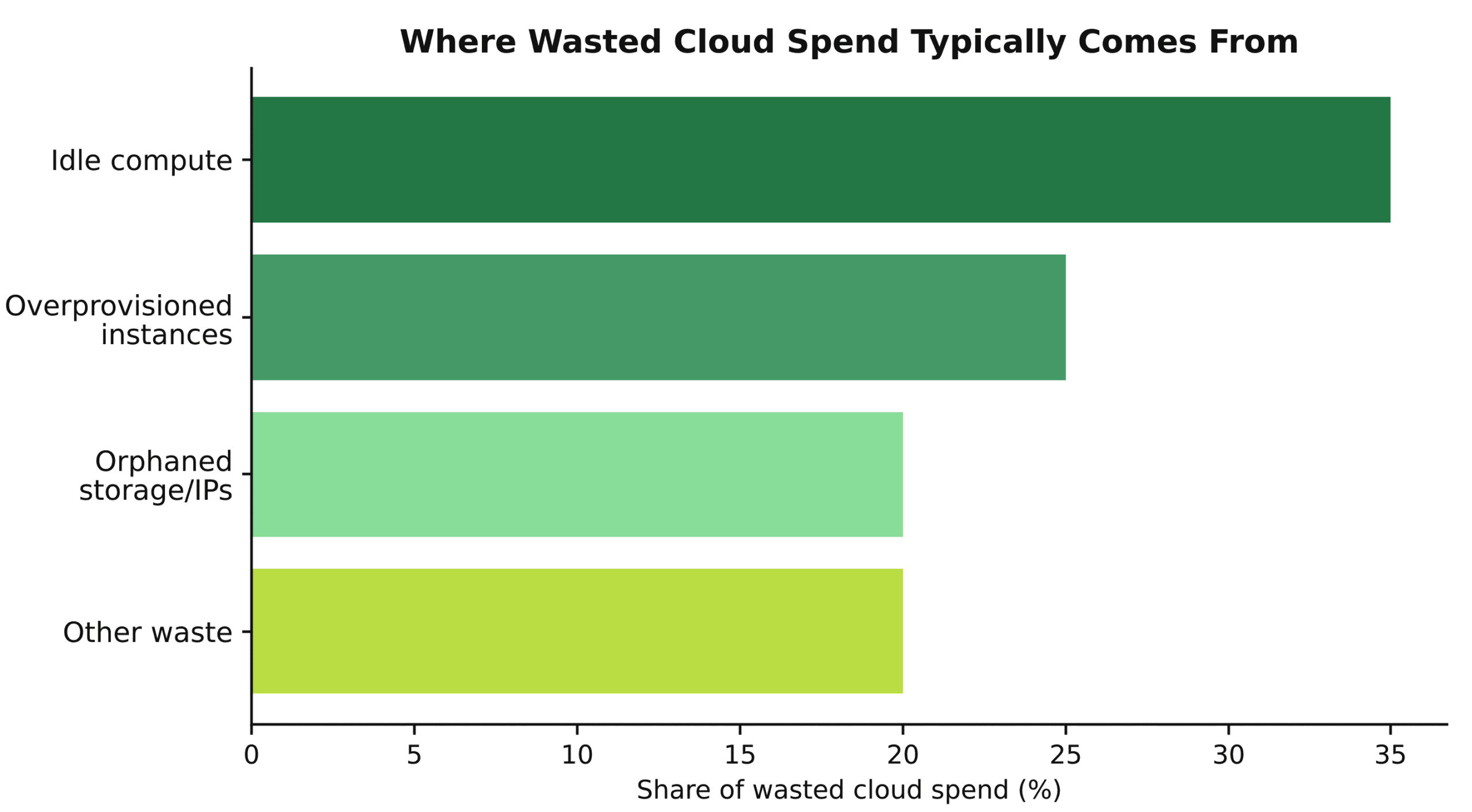
Image 1. Typical breakdown of wasted cloud spend by category.
Cloud Cost Optimization Levers
Cloud cost optimization can involve several actions, but their potential savings, implementation effort, and suitability vary by workload. The table below compares the main optimization levers and shows where each one can provide the greatest value. It can help teams determine which actions to prioritize based on current resource usage, workload stability, and the level of operational change required.
| Lever | Typical Savings | Effort | Best For |
|---|---|---|---|
| Idle & orphaned resource cleanup | 10–15% | Low | Immediate quick win, any environment |
| Rightsizing overprovisioned instances | 15–25% | Low–Medium | Workloads sized for peak but running steady |
| Autoscaling & non-prod scheduling | 10–20% | Medium | Dev/test environments, variable-traffic production |
| Reserved Instances / Savings Plans | 30–40% off baseline | Medium | Stable, rightsized workloads with 3–6 months of usage data |
| Spot instances | Up to 70–90% off on-demand | Medium–High | Fault-tolerant, interruptible workloads |
Benefits and Common Pitfalls
Benefits
Fast, low-risk savings. Idle resource cleanup and rightsizing do not change application behavior, so the risk of regression is limited.
Savings that build across phases. Each phase makes the next one more effective. Clear visibility often reveals waste that teams did not know existed.
More budget for AI workload growth. Reducing waste in existing compute creates room for Data & AI workloads without increasing total cloud spending.
Certified execution. TechBar engineers hold AWS, Google Cloud, and Azure certifications across cloud cost and infrastructure optimization. Learn more about who we are.
Start with idle and orphaned resources. This is usually the fastest and lowest-risk action, and the resulting savings can fund the engineering work required for rightsizing.
Do not buy Reserved Instances or Savings Plans before rightsizing. A three-year commitment for an oversized instance preserves the waste for the full term.
Cloud cost optimization requires recurring review. Without an ongoing operating phase that covers tags, usage, and scaling policies, inefficient spending can return within a few billing cycles.
Common Pitfalls
Optimizing without visibility. Reducing costs for resources whose ownership or purpose has not been confirmed can affect important workloads.
Treating rightsizing as a one-time task. Workload patterns change, so an annual review can miss several months of inefficient usage.
Ignoring non-production environments. Development and test environments that run continuously on production-grade instances are a frequent and easily corrected source of waste.
Underestimating AI and GPU cost growth. GPU inference spending is increasing faster than many other cloud cost categories and needs its own review schedule.
The Cloud Cost Optimization Checklist
- Consolidate billing and usage data across all accounts, regions, and providers.
- Tag every resource and assign clear ownership to a team or product.
- Identify and remove idle, orphaned, and unattached resources first.
- Rightsize overprovisioned instances and container clusters based on actual usage rather than peak assumptions.
- Apply autoscaling and automatic shutdown schedules to non-production environments.
- Purchase Reserved Instances or Savings Plans only after collecting three to six months of stable usage data from rightsized resources.
- Set a recurring review schedule. TechBar can support ongoing FinOps reviews through staff augmentation and access to vetted cloud engineers.
“The waste is rarely in the exotic stuff. It’s in the dev environment nobody turned off and the reserved instance someone bought before checking if the box was even the right size.”
– Bohdan Steblianko, CEO, TechBar
Key Takeaways
Cloud waste rarely results from one major mistake. It accumulates through idle resources, oversized instances, and commitments purchased before resource requirements are confirmed. An effective cloud cost optimization process starts with visibility, continues with rightsizing, and applies commitments only after usage becomes stable. Regular reviews help preserve the savings as workload patterns change.
TechBar’s Cloud Engineering team conducts cost and usage audits before recommending changes. The team can also support ongoing FinOps work with senior nearshore engineers available within one to two weeks. Contact TechBar to discuss where your cloud spending is going and which optimization actions should come first.

Bohdan Steblianko CEO
FAQs
-
What should a company review first during cloud cost optimization?
Begin with billing visibility, resource tags, and ownership. Once each cost is connected to a workload, team, or product, the company can safely identify idle resources and oversized capacity without disrupting important services.
-
Can cloud costs be reduced without affecting application performance?
Yes. Removing unused resources, scheduling non-production environments, and rightsizing based on actual utilization can reduce spending while preserving required capacity. Performance metrics and service-level objectives should remain part of every change review.
-
When should a company purchase Reserved Instances or Savings Plans?
Commitments should follow rightsizing, not precede it. A team should first collect three to six months of stable usage data from correctly sized workloads. This prevents the company from committing to more capacity than the product needs.
-
How often should cloud cost optimization be reviewed?
Cost and usage should be monitored continuously, with formal reviews scheduled according to the rate of infrastructure change. Fast-growing products, variable workloads, and AI or GPU environments usually require more frequent reviews than stable systems.