Article Highlights
- System age alone does not justify modernization; risk, cost, and ability to change provide stronger evidence.
- Unsupported technology, unresolved security gaps, and unreliable critical workflows require early assessment.
- Scaling limits, fragile integrations, and slow releases can directly restrict product and business plans.
- Manual workarounds and knowledge concentration increase operating cost and continuity risk
- Each warning sign should have measurable evidence, documented business impact, and an accountable owner.
A legacy system is defined by its current risk, cost, and ability to support change rather than its installation date. An older application can remain suitable if it is secure, supported, stable, and capable of meeting business needs. A newer system can already show the signs of a legacy system if it is difficult to update, expensive to operate, or dependent on unsupported technology.
Age alone is therefore not a sufficient reason for modernization. Changes become necessary when the system creates unacceptable operational or security risk, increases the cost of maintenance and every subsequent release, restricts scalability, complicates integrations or data access, or prevents the company from executing its product and business roadmap.
The condition of the system should be assessed against its business role. A stable internal application with limited change requirements presents a different risk from an unsupported platform responsible for payments, customer data, or daily operations. The same technical limitation can therefore require different action depending on the probability and business impact of failure.
UK government guidance on managing legacy technology classifies technology as legacy when it has reached end of life, lost supplier support, cannot be updated, has become uneconomical, or exceeds the organization’s acceptable risk threshold. This definition treats legacy status as a measurable operating condition rather than a label based only on age.
The following signs of a legacy system help determine when technical limitations have started to affect operating stability, security, delivery speed, and business growth.
10 Signs of a Legacy System That Is Limiting Business Growth
The following signs of a legacy system connect technical conditions to operational risk, delivery constraints, and business impact. One sign does not always justify full modernization, but several related problems usually indicate that the current system requires structured assessment.
1. Core Technologies Are Reaching End of Support
A system becomes difficult to maintain when its operating system, database, framework, runtime, middleware, or hardware has reached the end of support or is approaching it. Security patches stop, newer libraries become incompatible, replacement hardware becomes difficult to source, and vendor assistance moves to expensive extended-support contracts or excludes the installed version.
Dependencies often make the problem larger. Updating one component can require simultaneous changes to the application, database, infrastructure, and connected systems. This increases release risk and can leave the company dependent on components that cannot be safely patched.
Document unsupported components, official support deadlines, blocked dependency updates, extended-support costs, security exceptions, and available upgrade paths. These findings help determine if the affected components should be upgraded, replatformed, or replaced. A complete system rebuild is not the automatic response.
2. Security or Compliance Gaps Cannot Be Fully Remediated
One of the more serious signs of a legacy system is a known security or compliance gap that cannot be corrected within the current architecture. The application might lack support for modern authentication, detailed access policies, encryption, data masking, tamper-resistant audit logs, or required retention and deletion rules.
In these cases, teams often rely on network restrictions, manual reviews, or other compensating controls instead of correcting the source of the risk. Repeatedly renewed exceptions indicate that a temporary measure has become part of normal operations.
Assess vulnerabilities by exploitability and exposure rather than counting them equally. Track vulnerabilities that cannot be patched, unresolved audit findings, the age of security exceptions, excessive permissions, and the coverage of multi-factor authentication (MFA), role-based access control (RBAC), encryption, and audit logging.
This condition requires priority attention when the system processes personal, financial, medical, or regulated data. The immediate task is to reduce current exposure. The longer-term decision can involve upgrading selected components, isolating sensitive functions, replatforming, or replacing the affected system.
3. Critical Workflows Are Unreliable
Recurring outages, timeouts, and failed jobs indicate that instability has become an operating condition rather than an isolated incident. Engineers restart services manually, peak demand causes failures, users detect problems before monitoring systems, and recovery depends on specific employees. Backups can exist without a tested restoration process, while routine maintenance requires long service interruptions.
Reliability should be measured at the workflow level. Server uptime does not confirm that a user can complete a payment, submit an order, access a medical record, or generate a report. Track successful transaction rate, workflow availability, incident frequency, recovery time, recurring root causes, manual recovery hours, and error-budget consumption where service-level objectives are defined.
Compare actual recovery performance with the recovery time objective (RTO), which defines how quickly service must be restored, and the recovery point objective (RPO), which defines the maximum acceptable amount of data loss measured in time.
The first response can include improved monitoring, tested backups, automated recovery, dependency isolation, and correction of recurring failure modes. The confirmed cause should determine the modernization scope.
4. The System Cannot Handle Expected Growth
A system can appear stable under current demand while having little capacity for additional users, transactions, or data. Performance declines as traffic increases, batch jobs exceed their processing window, and the database becomes a persistent bottleneck. Peak periods require manual preparation, while large customers need separate infrastructure or special operating procedures.
A common architectural constraint is a component that cannot scale independently. The company must then increase capacity for the entire application, often by purchasing larger servers. This approach raises costs without correcting the underlying limitation.
Measure p95 and p99 latency, resource saturation, queue lag, batch duration, database locking, query time, and maximum verified throughput. P95 latency shows the response time within which 95% of requests complete, while p99 exposes delays affecting the slowest 1%. Load tests should compare current capacity with a realistic 12- to 24-month demand forecast.
Cost growth also matters. If infrastructure spending rises faster than users, transactions, or processed data, the scaling model is becoming less efficient. These are measurable signs of a legacy system restricting growth even before a major outage occurs.
The next step is to locate the actual constraint. Database tuning, caching, asynchronous processing, replatforming, or redesigning one component can be sufficient. The evidence should determine the scope of work.
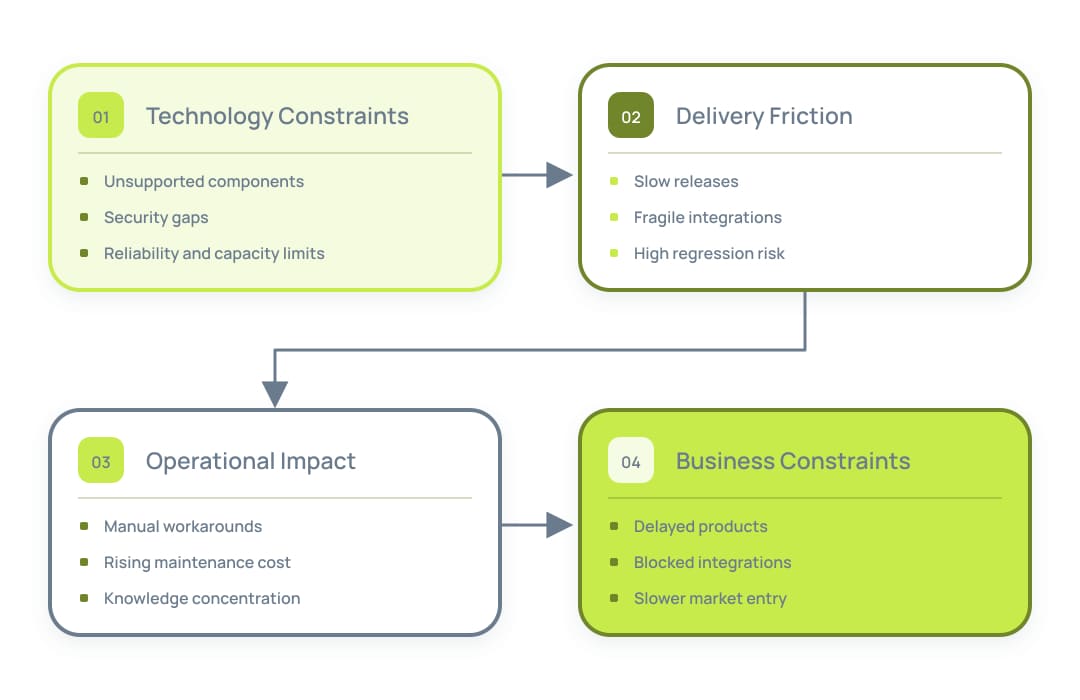
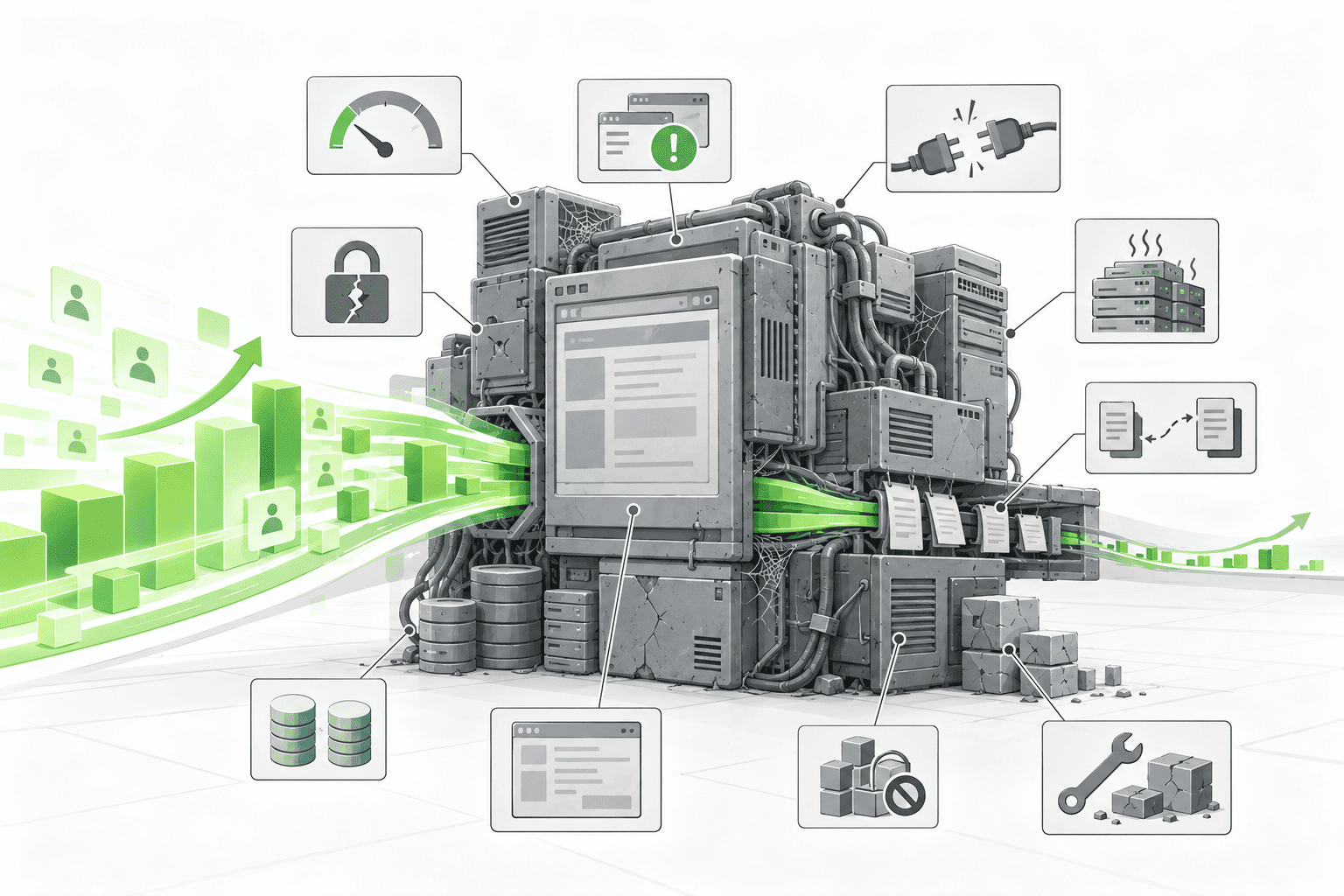
Image 1. How legacy constraints spread across the business
5. Small Changes Take Too Long and Cause Regressions
A minor business-rule update should not require weeks of analysis, broad manual testing, and changes across unrelated modules. When teams avoid parts of the codebase, add large uncertainty buffers to estimates, or release infrequently because every deployment carries high risk, the system is affecting the product roadmap.
Track DORA’s five software delivery metrics: change lead time, deployment frequency, failed deployment recovery time, change fail rate, and deployment rework rate. Code-review time, testing time, post-release defects, and the number of components affected by a typical change can provide additional evidence for the specific application.
This condition can require better automated testing, clearer module boundaries, dependency separation, continuous integration and continuous delivery (CI/CD) improvements, or focused refactoring of frequently changed areas. Rebuilding the complete system is often unnecessary when the main constraint is concentrated in a limited part of the codebase.
6. Every New Integration Requires a Custom Workaround
Another of the common signs of a legacy system is the inability to exchange data reliably with software-as-a-service (SaaS) platforms, partner systems, mobile applications, or analytics tools. Teams compensate with comma-separated values (CSV) files, email attachments, shared folders, direct production-database access, and point-to-point scripts.
These connections are difficult to monitor and change. A schema update can break several downstream systems, reconciliation remains manual, and onboarding a new customer, supplier, or partner takes far more time than expected. The absence of versioned application programming interfaces (APIs) also makes it difficult to change integrations without affecting existing consumers.
Track integration delivery time, manual data transfers, point-to-point connections, related incidents, reconciliation effort, API errors and timeouts, and partner onboarding time. The pattern matters more than the number of integrations: a small group of fragile connections can create more operating risk than a larger set of monitored interfaces.
A full core replacement is not always required. An API layer, event interface, or integration platform can create a controlled boundary around the existing system. Deeper changes are required when the underlying data model cannot represent the information that connected systems need.
7. Employees Work Around the System
Spreadsheets, duplicate entry, manual approvals, and unofficial databases often contain work that the main system cannot support. Employees move information between applications, build reports through manual exports, track approval status in email or chats, and maintain important calculations outside the controlled environment.
These workarounds increase processing time and make data quality dependent on individual actions. Measure manual steps per transaction, waiting time, rework, duplicate records, hours spent on exports and reconciliation, and errors caused by manual handling. The number of unofficial spreadsheets is useful only when combined with their business role and the consequences of incorrect data.
The UK’s 2025 State of Digital Government Review reported that 47% of central government services and 45% of National Health Service services lacked a complete digital pathway, while very few services operated without manual processing. This is public-sector evidence, but it illustrates how gaps in digital systems can create a persistent operational burden.
Before changing the system, document the process as employees actually perform it. Informal spreadsheets, approvals, and manual checks often contain business rules that are absent from official documentation. Losing those rules during migration can create new operational failures.
The presence of workarounds does not prove that every part of the application requires replacement. Frequent manual handling across critical workflows is one of the clearer signs of a legacy system that is increasing cost, error exposure, and dependence on specific employees.
8. Maintenance Costs Are Growing Faster Than Business Value
A system can remain operational while consuming an increasing share of the technology budget. Licensing and support fees rise, specialist contractors become more expensive, engineers spend more time responding to incidents, and recurring defects require repeated correction. Infrastructure cost can also increase faster than customer or transaction volume.
The assessment should cover the complete annual run cost rather than infrastructure alone. Include licenses, support contracts, maintenance engineering, incident response, manual operations, hardware replacement, compliance exceptions, and the cost of delayed roadmap initiatives. Unit measures such as cost per customer, transaction, order, or processed record show if the system is becoming less economical as demand grows.
Engineering capacity is another part of the calculation. If most of the team’s time is spent maintaining existing behavior, less capacity remains for revenue-generating features, security improvements, and operational changes. This pattern is one of the signs of a legacy system creating a direct opportunity cost.
Compare several options across the same time horizon: retain the current system, stabilize it, replatform selected components, refactor high-cost areas, or replace the application. A one-year maintenance budget and a multi-year modernization estimate are not directly comparable. Each scenario should include implementation, transition, operating costs, risks, and expected business value.

9. Critical Knowledge Is Concentrated in Too Few People
System continuity becomes fragile when only one or two people can deploy, troubleshoot, or recover the application. The risk increases when business rules are undocumented, environments are configured manually, the application cannot be built from the current repository, or important technical decisions exist only in individual memory.
Measure the bus factor for critical capabilities: the number of people whose absence would prevent the team from completing an important task. Also review onboarding time, undocumented components, build reproducibility, environment setup, hiring costs, and the time required for another engineer to resolve an incident without help from the primary specialist.
Knowledge concentration affects more than support. It slows estimates, restricts team changes, increases dependence on external vendors, and makes modernization harder to plan. A system with limited documentation and a low bus factor can remain stable until the person holding the knowledge becomes unavailable.
Knowledge capture should begin before major code changes. Architecture maps, business rules, dependency inventories, automated tests, runbooks, build instructions, and recovery procedures reduce immediate operating risk and provide evidence for the modernization scope. A complete rewrite will not correct knowledge gaps if undocumented rules are lost during migration.
10. The System Is Blocking Business Initiatives
The strongest business-level signs of a legacy system appear when technical constraints delay or prevent planned initiatives. The company can struggle to introduce a new product or pricing model, enter another market, support mobile or self-service channels, integrate an acquired business, meet a regulatory requirement, or provide an enterprise customer with the required application programming interface (API).
The same limitation can restrict access to operational data for analytics or artificial intelligence (AI), or prevent teams from adapting workflows to a new operating model. At this point, the problem is visible outside engineering because it affects revenue, customer commitments, compliance, and strategic timelines.
Document initiatives that were delayed, reduced in scope, or rejected because of system constraints. Estimate the revenue connected to delayed capabilities, deals affected by security or integration requirements, time required to add a country or customer type, and the expected duration of acquisition integration. Comparing these estimates with similar changes in more adaptable systems can help quantify the delivery constraint.
This evidence turns modernization into a business case. The case should identify the blocked initiative, the cost of delay, the affected customers or operations, and the specific architectural constraint responsible. When several strategic initiatives depend on the same technical limitation, the business impact becomes one of the clearest signs of a legacy system requiring action.
Legacy System Modernization Assessment Checklist
Individual signs of a legacy system do not automatically justify replacing the complete application. Use this checklist to connect each issue to evidence, business impact, and an accountable owner.
Scoring Scale
Apply the same scale to all ten assessment areas:
| Score | Meaning | Description |
|---|---|---|
| N/A | Not assessed | Evidence is missing or the area has not been evaluated |
| 0 | No material issue | Evidence confirms that the issue is absent or has no measurable impact |
| 1 | Emerging | The issue occurs occasionally but remains manageable |
| 2 | Material | The issue regularly affects users, operations, cost, or delivery |
| 3 | Critical | The issue creates immediate security, continuity, compliance, or business risk |
Assessment Table
The table below is an example assessment template. Teams can adapt the questions, evidence requirements, business-impact fields, and ownership roles to the system’s scope and risk profile.
| Assessment area | Question to answer | Score 0–3 | Evidence to collect | Business impact | Owner |
|---|---|---|---|---|---|
| Technology support | Are critical components unsupported or approaching the end of support? | Vendor notices, dependency inventory, support contracts | Security exposure, upgrade limits, higher support cost | Platform or infrastructure owner | |
| Security and compliance | Are there gaps that cannot be fully corrected? | Vulnerability reports, audit findings, risk exceptions | Breach exposure, fines, failed audits, lost contracts | Security or compliance owner | |
| Reliability | Do critical workflows experience recurring failures or manual recovery? | Incident history, service-level objective results, recovery logs | Downtime, lost transactions, customer complaints | Engineering or operations owner | |
| Scalability | Can the system support expected growth in traffic, users, and data? | Load tests, capacity metrics, latency, database metrics | Growth limits, poor performance, rising infrastructure cost | Software architect | |
| Changeability | Are small changes slow, risky, or likely to cause regressions? | Lead time, change fail rate, testing time, release frequency | Delayed roadmap, higher development cost | Vice President of Engineering | |
| Integration | Does each connection require custom scripts or manual transfers? | Integration inventory, delivery time, failures, reconciliation records | Slow onboarding, data delays, operational errors | Integration architect | |
| Manual workarounds | Do employees rely on spreadsheets, exports, or duplicate entry? | Process maps, interviews, task observation, error records | Lower productivity, incorrect data, longer processing | Process or operations owner | |
| Maintenance cost | Is operating cost growing faster than usage or business value? | Infrastructure, licenses, support, incidents, engineering hours | Lower margins, reduced product capacity | Chief Technology Officer or finance owner | |
| Knowledge concentration | Does the system depend on a small number of specialists? | Documentation coverage, onboarding time, skills inventory | Continuity risk, expensive support | Engineering manager | |
| Business constraints | Has the system delayed products, markets, integrations, or regulatory changes? | Delayed initiatives, rejected requirements, affected deals | Lost revenue, slower market entry, strategic limits | Product owner or Chief Operating Officer |
Use Measurable Evidence
Monitoring data, incident records, security findings, vendor documentation, delivery metrics, cost reports, process maps, customer complaints, and delayed initiatives are valid evidence. General statements are insufficient.
Evidence example: Median lead time for a production change increased from 8 to 21 days over the last 12 months. Three of the last ten releases required a rollback or hotfix. This evidence identifies the scale, frequency, and business consequence of the problem.
How to Interpret the Assessment Results
Do not calculate a total score and apply a universal modernization threshold. The number of identified issues does not show their severity, business impact, or urgency. One critical security exposure, data-loss risk, or unsupported production component can require faster action than several manageable issues.
Start by identifying urgent triggers. A score of 3 in security, data integrity, compliance, business-critical reliability, or technology support should trigger an immediate technical assessment and risk-reduction plan. End-of-support deadlines, repeated outages, and unresolved compliance findings can also override the general prioritization order.
Next, review where scores of 2 or 3 are concentrated. Material issues limited to reporting, integrations, the database, user interface, deployment process, or document processing can indicate a targeted modernization candidate. When material issues span reliability, scalability, changeability, security, operating cost, and business constraints, isolated fixes are less likely to address the main architectural problem.
Business value and technical risk should then determine the initial direction:
| Business value | Technical risk | Recommended direction |
|---|---|---|
| High | High | Prioritize modernization |
| High | Low | Monitor and improve selectively |
| Low | High | Evaluate replacement or retirement |
| Low | Low | Retain and review later |
This matrix adapts the workload prioritization logic described in the Microsoft Cloud Adoption Framework.
High-value, high-risk systems are strong modernization candidates. High-value systems with low technical risk can remain under monitoring, while low-value, high-risk systems require a case-specific decision between limited remediation, replacement, and retirement.
The matrix provides an initial direction rather than selecting a modernization strategy automatically. The next step is to examine the affected components, dependencies, business requirements, implementation risk, and remaining system life. Our guide to legacy application modernization strategies explains the available approaches in more detail.
Assessment Output
The completed assessment should identify confirmed problems, severity, supporting evidence, affected users and processes, current workarounds, accountable owners, and components requiring detailed discovery. It should support an initial decision to retain, stabilize, modernize, replace, or retire the system.
Key Takeaways
A system becomes legacy when its technical condition creates unacceptable risk, cost, delivery delays, or limits on business growth. Age alone does not determine the need for modernization.
The signs of a legacy system should be supported by evidence such as incidents, security findings, delivery metrics, capacity tests, operating costs, and delayed business initiatives. Their severity and business impact matter more than the total number of warning signs.
Use business value and technical risk to determine the initial direction. High-value, high-risk systems are strong modernization candidates, while low-value systems with high risk can be better candidates for replacement or retirement.
If the assessment reveals a high-impact constraint, the next step is to define the smallest practical change that reduces it without placing critical operations at unnecessary risk.
Techbar’s Legacy Modernization services can help assess the affected architecture and deliver changes in controlled stages.

Bohdan Steblianko CEO
FAQs
-
What are the most common signs of a legacy system?
Common signs of a legacy system include unsupported technology, unresolved security gaps, recurring failures, limited scalability, slow and risky releases, fragile integrations, manual workarounds, rising maintenance costs, concentrated technical knowledge, and blocked business initiatives. The strongest evidence is a measurable effect on users, operations, cost, or business plans.
-
Does an old system always need modernization?
No. An older system can remain suitable if it is supported, secure, reliable, cost-effective, and capable of meeting expected business needs. Modernization becomes relevant when the system’s condition creates material risk or restricts necessary change.
-
How many legacy system warning signs require action?
There is no universal number. One critical security, compliance, or data-loss risk can require immediate action, while several emerging issues can remain manageable. Each sign should be evaluated by severity, evidence, business impact, and urgency.
-
What is the difference between technical debt and a legacy system?
Technical debt refers to design, code, testing, or architecture decisions that increase the cost or risk of future changes. A legacy system is a broader condition that can include technical debt, unsupported products, outdated infrastructure, knowledge gaps, operational workarounds, and constraints on business growth.
-
Should a legacy system be modernized, replaced, or retired?
The decision depends on business value and technical risk. High-value systems with serious technical constraints are strong candidates for modernization, while low-value, high-risk systems can be better candidates for replacement or retirement. Systems with low risk can often be retained and reviewed later.